> ## Documentation Index
> Fetch the complete documentation index at: https://help.arcus.xyz/llms.txt
> Use this file to discover all available pages before exploring further.
# How to onboard and fund a testnet wallet
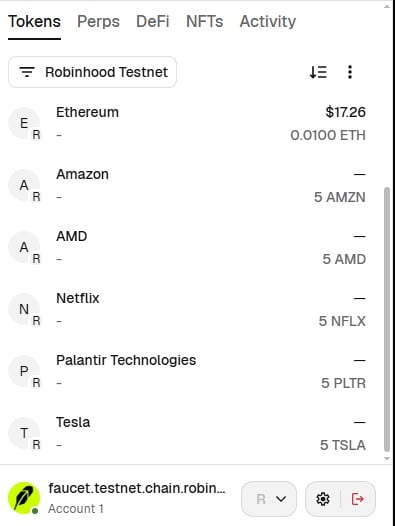
1. Before you begin: Your wallet must have some RobinHood Testnet ETH. Go to [https://faucet.testnet.chain.robinhood.com](https://faucet.testnet.chain.robinhood.com) and it'll give you: 0.01 ETH, and 5 each of TSLA, AMZN, PLTR, NFLX, and AMD. You're ready for the next step if you see these tokens in your wallet.
 2. Go to [https://testnet.arcus.xyz/trade/perpetuals/BTC-USD](https://testnet.arcus.xyz/trade/perpetuals/BTC-USD) and connect the wallet (two steps to sign in the first time: 1) connect, and 2) sign a message.
3. Click 'Enable Trading', acknowledge the checkbox on the Terms of Use, and Confirm. This will prompt your wallet to sign another message which generates the API key for the frontend.
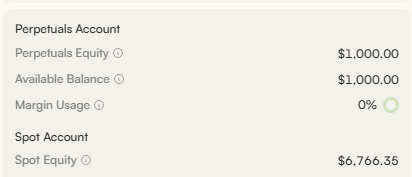
4. Click Testnet Deposit button in the upper right corner and this will create an actual transaction (prior wallet interactions did not create any transactions on-chain). Once confirmed (in a few seconds), you will see \$1000 in your balance.
2. Go to [https://testnet.arcus.xyz/trade/perpetuals/BTC-USD](https://testnet.arcus.xyz/trade/perpetuals/BTC-USD) and connect the wallet (two steps to sign in the first time: 1) connect, and 2) sign a message.
3. Click 'Enable Trading', acknowledge the checkbox on the Terms of Use, and Confirm. This will prompt your wallet to sign another message which generates the API key for the frontend.
4. Click Testnet Deposit button in the upper right corner and this will create an actual transaction (prior wallet interactions did not create any transactions on-chain). Once confirmed (in a few seconds), you will see \$1000 in your balance.